Slickplan, the Internet’s favorite website planning tool
Say hello to Slickplan, the only collaborative website planning suite that takes your projects from concept to completion.
14-day free trial
No credit card required

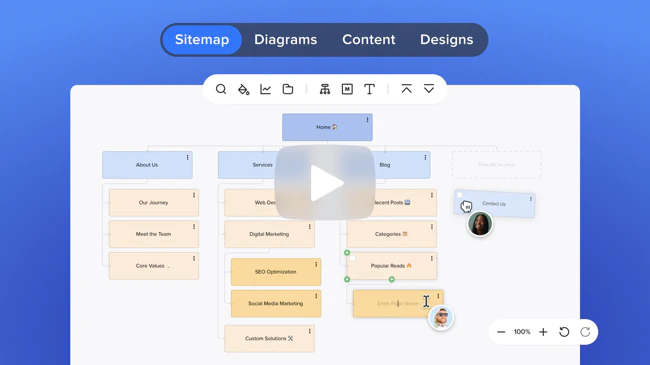
Say hello to Slickplan, the only collaborative website planning suite that takes your projects from concept to completion.


Simplify the website planning process and improve user experience with Slickplan's intuitive website design planner tools, including a powerful sitemap creator to hone your site's navigation.
Create refined sitemap structures and flowcharts
Build diagrams and user journey paths
Gather and plan content with your team
Showcase design mockups and get feedback
 Sitemap Builder
Build a sitemap
in just a few minutes
Create a sitemap using an easy drag and drop tool or use our website crawler to import an existing site.
Learn more about Sitemap Builder
As a business that delivers integrated marketing models to clients, Slickplan helps us understand sitemap structure & how to plan the customer journey.
Stephen Taylor-Brown, Head of Strategy at Abacus
 Diagram Maker
Create diagrams like user flows, journey maps & more
Build intuitive user journeys, optimize processes & fix pain points en route to improving your site’s UX.
Learn more about Diagram Maker
The answer to all my prayers. Probably the best and most helpful software since Evernote.
Ibrahim Taguri, CEO at Rebel Cause
 Content Planner
Plan & create website
content with teams
Develop, gather and organize your site’s content in a centralized workspace. Craft custom pages or use templates to speed things up.
Learn more about Content Planner
I used to juggle several apps to get information across to content owners and technical staff. Now I don’t have to as it’s all in one place...just brilliant!
Neil Kulas, Web Designer at Tobii Dynavox Cause
 Design Mockups
Share your UX/UI designs
and get feedback quickly
Upload unlimited wireframes & mockups. Get notes from your team and stakeholders.
Learn more about Design Mockups
When I have to share mockups, I go to Slickplan. They make it easy to upload wireframes or other graphical elements and seamlessly share them with clients.
Kevin Veitia, Founder at OuiGrowth
Free demo – See how Slickplan works
Let us show you how easy planning websites can be!

Visualize solutions with your team while planning site UX/UI. Create:
Streamline the design process. Present:

Develop richer content for your target audience. With one tool:
Work with writers and editors to simplify content creation:

Work together to build websites that convert. Optimize:
Tools to turbocharge your marketing strategies:

Work smarter and wow clients with the scope of work you can deliver:
Elevate your level of professionalism:

Make sure the job gets done right. Manage:
Oversee your team & keep stakeholders up to speed.

Create compelling client proposals:
Include all important players in the sales process and nail the pitch:

Enhance a website's usability by getting a bird's eye view. See:
When the destination is clear, you can code with confidence.

Strategize and direct website planning for all of your clients:
Keep clients happy and projects moving along with:
Integrations galore so you can keep using the tools you love. Connect Slickplan's website planner to your favorite project management apps and content management systems for a streamlined collaborative workflow that lets you and your team work exactly how you want.

Save time by transferring website structures, HTML and actual content directly to WordPress, Joomla, Drupal, Concrete 5 and Expression Engine.

Seamlessly connect Slickplan to web applications you already use. Get all your notifications, project statuses, updates and more.

Don’t see the integration you need? Don’t worry, our API lets you build your own custom integrations to support team workflows.
Simplify your website planning process with tools to help you at each stage.
1 Planning

2 Design

3 Prototyping

4 Development

5 SEO

6 Content



Our team-centric suite of tools is designed to take you from start to finish, from idea to full blown site. Check out how we stack up against the competition to get it done.


Slickplan’s site structure software improves cross-team communication to help pros or new-comers, large and small businesses alike create great user experiences. See what customers love about our tools, team and community.
Get around-the-clock help with live chat, customer support specialists and an in-depth knowledge base.
Customer satisfaction
Rated a high performer on G2Crowd with one of the highest customer satisfaction ratings among software vendors.

OMG am loving the online #site map creator, #slickplan. If you have a deep level site (and love your #Mac ) you will thank me later.
GazinDesign
@GazinDesign

All site mapped out this afternoon. A job made easier though with @slickplan
Andrew Armitage
@aarmitage

just started using @slickplan to visualise website IA's and have to say it is a very handy tool indeed. So easy to use #MakingLifeABitEasier
Heather Peacock
@heatherpea

We came here to eat lunch and plan websites, and we're all out of lunch. Currently using @slickplan, our team's new favorite tool!
Adashmore Creative
@Adashmore
Slickplan simplifies the website planning process for your whole team by putting all the tools you need in one place.
Slickplan takes all the pain out of content planning and client communication. Slickplan has become a critical tool for our workflow
Justin Foley, Partner at Mod Web
Create an account
Already have an account


