
Shipping on time depends on clear organization and visibility into work in progress. For UX designers working alongside dev teams, that isn’t always straightforward. Design work evolves through product iterations, which can make it harder to plan, track and coordinate with development and engineering teams.
Kanban and Scrum are two common approaches used by Agile teams to manage this complexity — Agile being a workflow that emphasizes iterative delivery, collaboration and adaptability. This article focuses on how UX Kanban supports continuous design work, how Scrum structures delivery through sprints and where UX teams often blend the two through an approach known as Scrumban.
Key takeaways
- UX Kanban supports continuous design work by visualizing tasks and limiting work in progress, helping UX teams maintain a sustainable pace as research and design evolve.
- Scrum provides a structured delivery rhythm through sprints and reviews, giving UX teams predictable checkpoints for feedback and alignment.
- Many UX teams blend both approaches through Scrumban, balancing continuous design flow with the structure of sprint-based delivery.
What is Kanban?
Kanban is a flow-based approach to managing work that visualizes tasks on a physical or digital board. For UX teams, it provides a clear way to track evolving design work as it moves from research through design, review and delivery — without relying on fixed timelines or sprints.
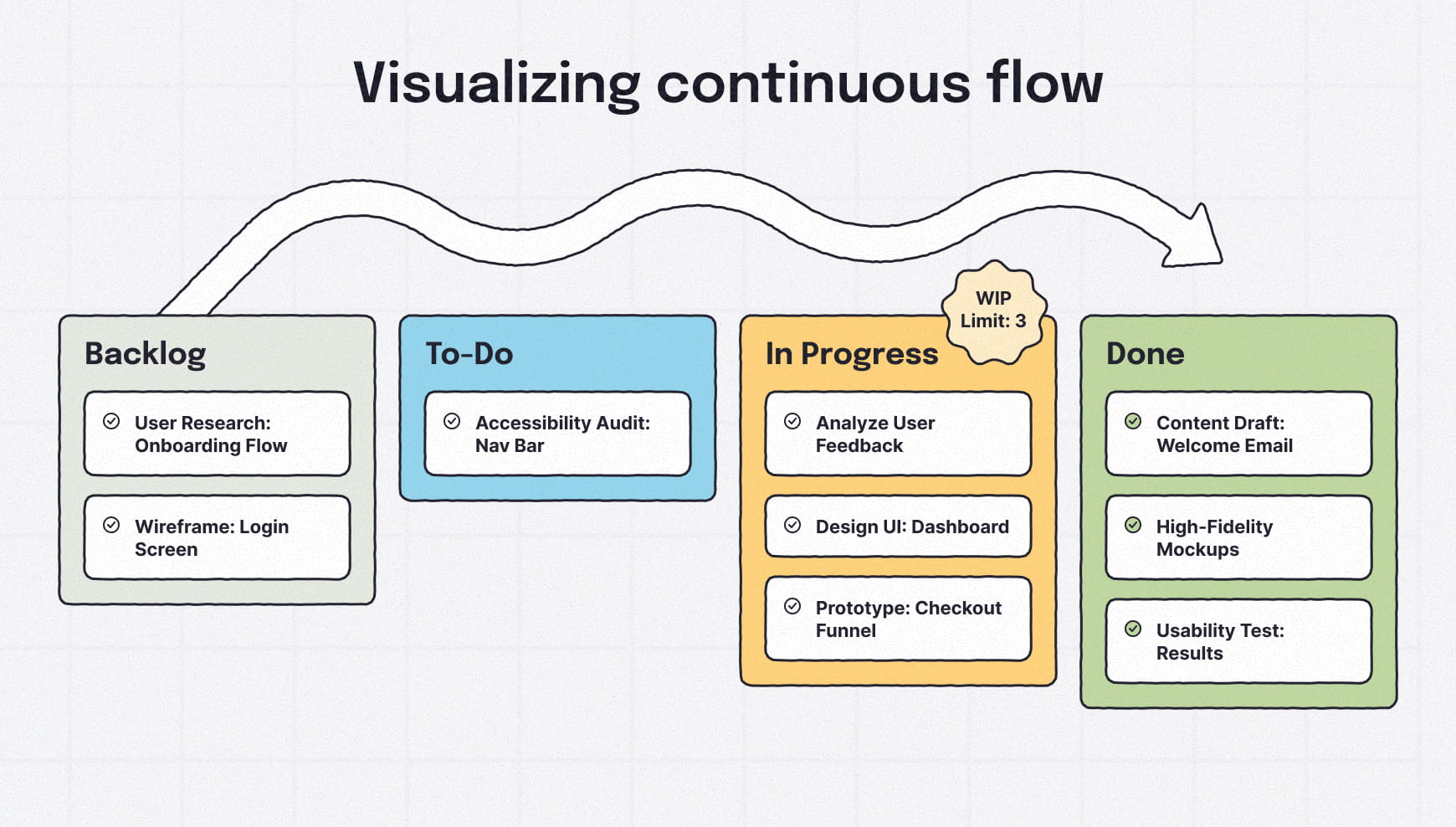
Beyond visibility, Kanban emphasizes flexibility and limiting work in progress (WIP), which helps UX designers avoid context switching and keep design work moving steadily.
Instead of organizing work into fixed time blocks, Kanban focuses on how tasks continuously move through a design system from start to finish.
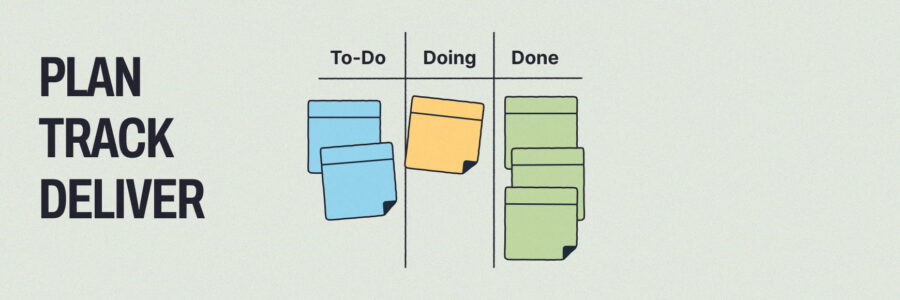
Think of Kanban cards as sticky notes moving step by step through the design process.
Basic Kanban terminology for UX teams: quick reference
Kanban board
A visual board that represents work as cards moving through defined stages, making the status of UX and design work visible to the entire team.
Kanban card
The individual "ticket" represents a specific task or UX activity.
Work in progress (WIP)
The number of tasks actively being worked on at any given time. Limiting WIP helps UX teams prevent overload and keep design work moving steadily.
Backlog
A prioritized list of upcoming UX and design work that has not yet entered the active workflow.
How to apply Kanban to UX design
A UX designer’s process includes the activities used to plan, create, refine and deliver design work across a product lifecycle. UX Kanban helps teams visualize that work as it evolves, rather than forcing it into rigid phases or timelines. While the order of the UX work may vary by designer or project, the core deliverables and stages tend to be consistent across teams and disciplines.
Kanban allows UX designers and Agile UX teams to visualize work on a shared board, where tasks are represented as cards and move through defined stages, visible to the rest of the team.
A typical UX Kanban board might include stages like Backlog, Research, Design, Review, Testing, Complete — though the exact stages vary by team and project.
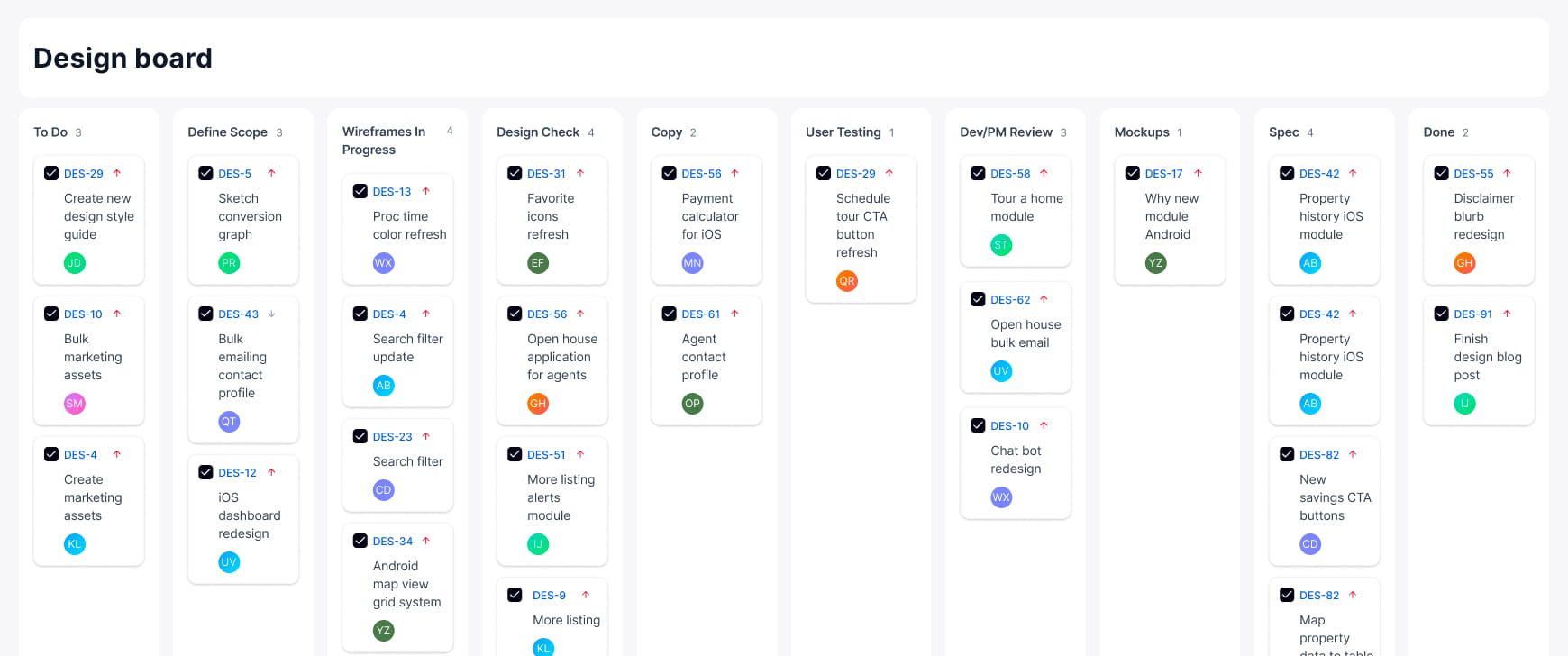
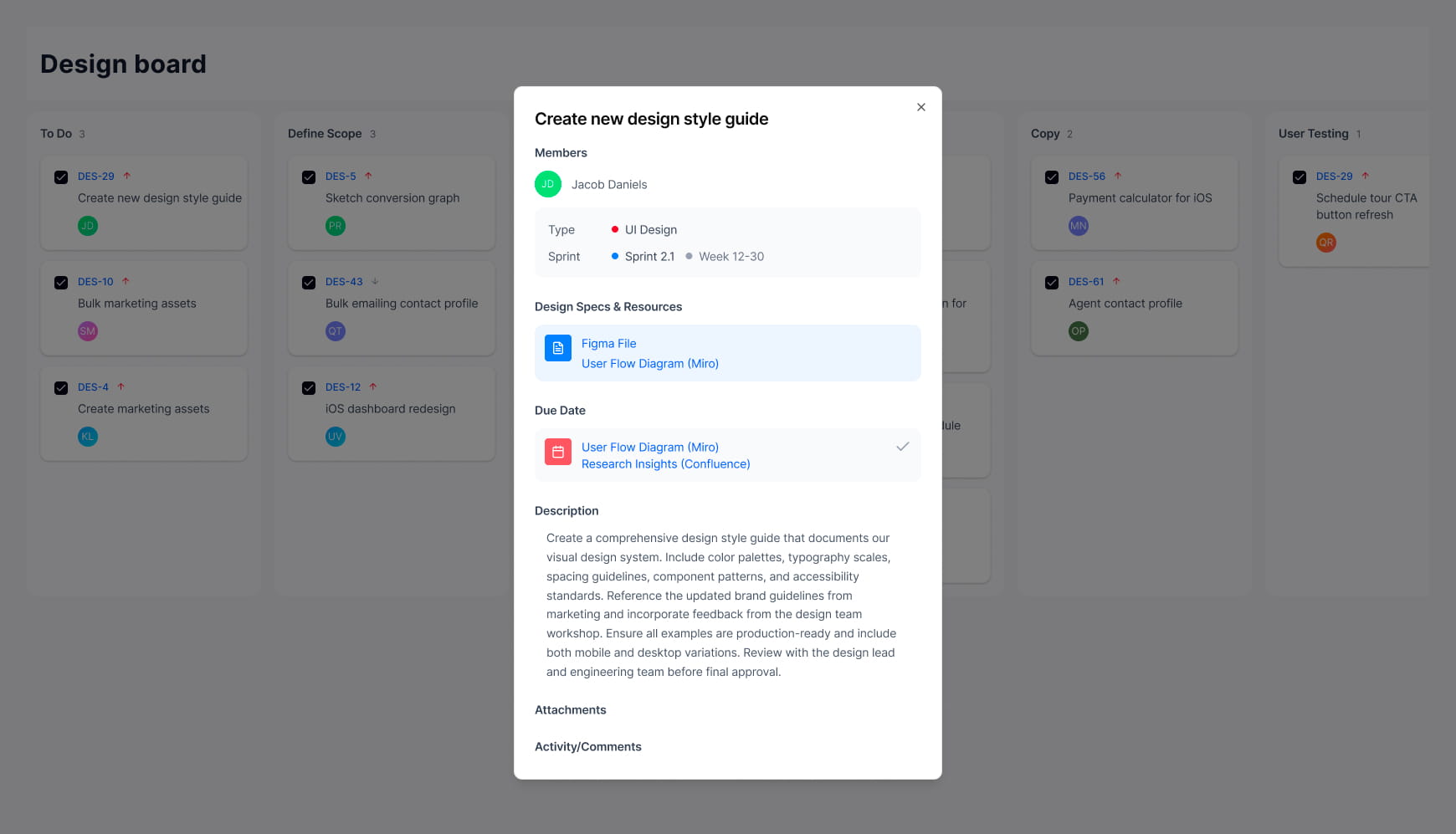
Each stage represents the state of the work, while individual task cards lay out the specific UX activities moving through those stages. For example, a UX designer might have cards for:
- Design ideas and discovery
- Specific user research methods like heatmapping
- Building user journeys
- Concept development
- Concept revisions
- Stakeholder interviews
- Competitive review
- Accessibility audit
- Wireframing
- Wireframe revisions
- Usability testing
- Quality assurance review
Related | For foundational clarity on UX/UI terminology, take a look at our design terms guide.
Benefits of Kanban UX design
Kanban cards help UX and development teams make design work visible and easier to manage as it progresses. Rather than tracking design tasks in isolation, cards provide shared context that supports coordination across roles and throughout the development process, ultimately creating a strong user and customer experience.
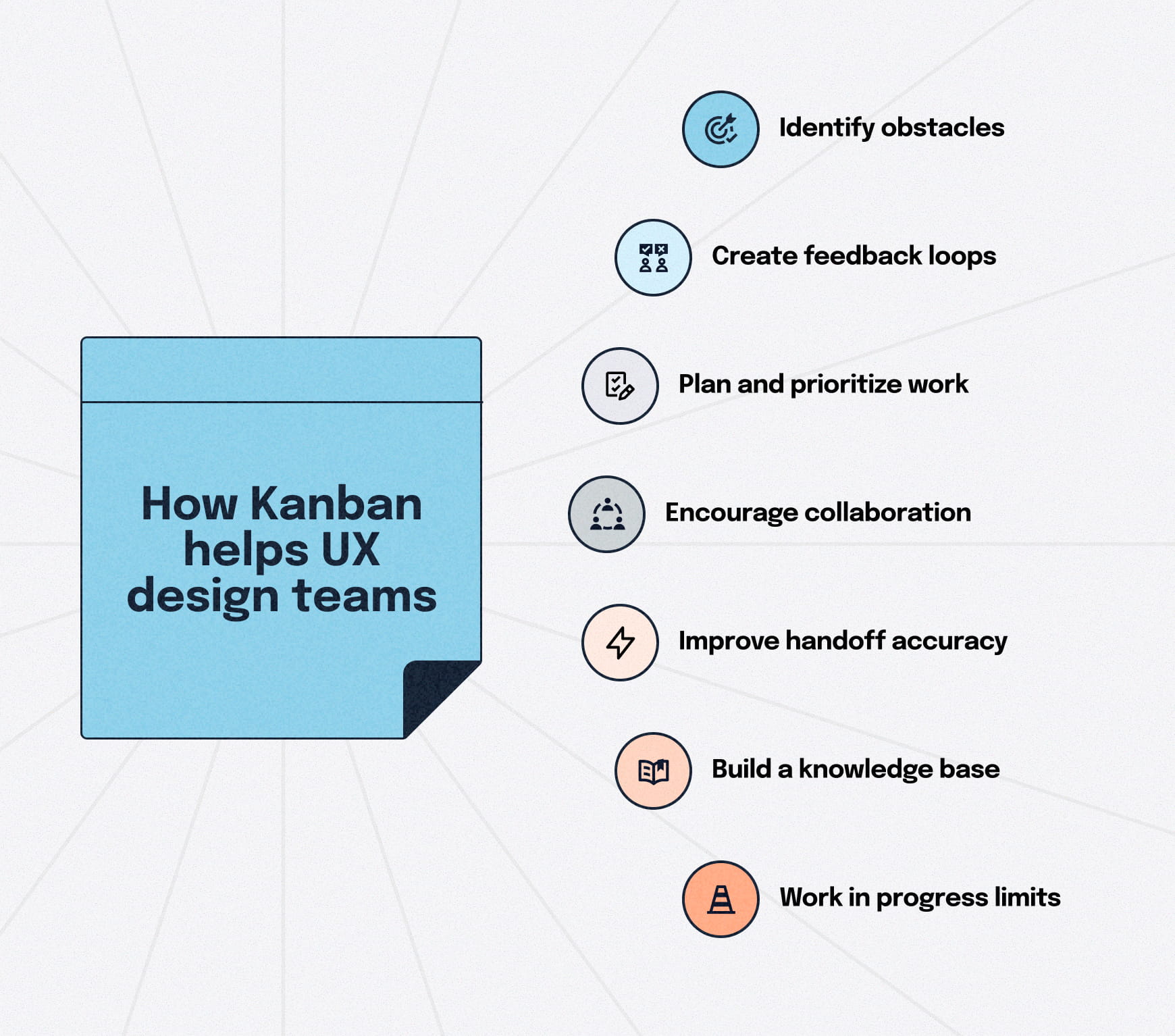
Identify obstacles and inefficiencies
By visualizing UX work as it moves through stages, teams can more easily spot bottlenecks, stalled tasks or work that is competing for attention. That visibility helps identify where a team’s work slows down, where dependencies exist and where rework is occurring.
Create feedback loops
With designated stages for reviews, Kanban cards make it easier for teams to see when design work is ready for input or validation. That supports more timely feedback from stakeholders and collaborators while reducing delays caused by unclear ownership or missed handoffs.
Plan and prioritize work more effectively
Limiting work in progress helps UX teams focus on fewer tasks at a time, reducing context switching and helping teams prioritize work based on current needs rather than static plans. That makes it easier to adjust priorities as new insights emerge.
Encourage collaboration
Because Kanban boards are shared, design work remains visible to developers, product managers, content writers and other contributors. That transparency supports collaboration by keeping everyone aligned on what’s in progress and what’s ready for feedback.
Improve handoff accuracy
Kanban cards serve as a single source of truth for a product team. By attaching resources like final Figma links, accessibility specs and research directly to the card, teams eliminate the "Which version is final?" confusion, ensuring they aren’t building from outdated work.
Build a searchable knowledge base
Unlike a chat thread or an email, completed Kanban cards create a permanent, searchable record of design decisions. If, six months later, someone asks why a specific user flow was chosen, the card provides the context — including any supporting data your team attaches, like user testing results or stakeholder feedback that led to that specific choice.
Stop starting, start finishing with work in progress limits
WIP limits prevent the team from becoming overloaded by capping the amount of active work at any one time. By restricting how many designs can be "in progress," teams are forced to complete and hand off existing tasks before pulling in new ones.
🎬 Learn what Slickplan can do!
We filmed a short video to show you exactly how to use Slickplan
What is Scrum?
Scrum is a structured framework for managing work through short, fixed-length cycles called sprints. Instead of a continuous flow, the team commits to a specific "batch" of work to be completed within that set timeframe. For UX teams, Scrum primarily provides a delivery rhythm that design work supports rather than fully conforms to.
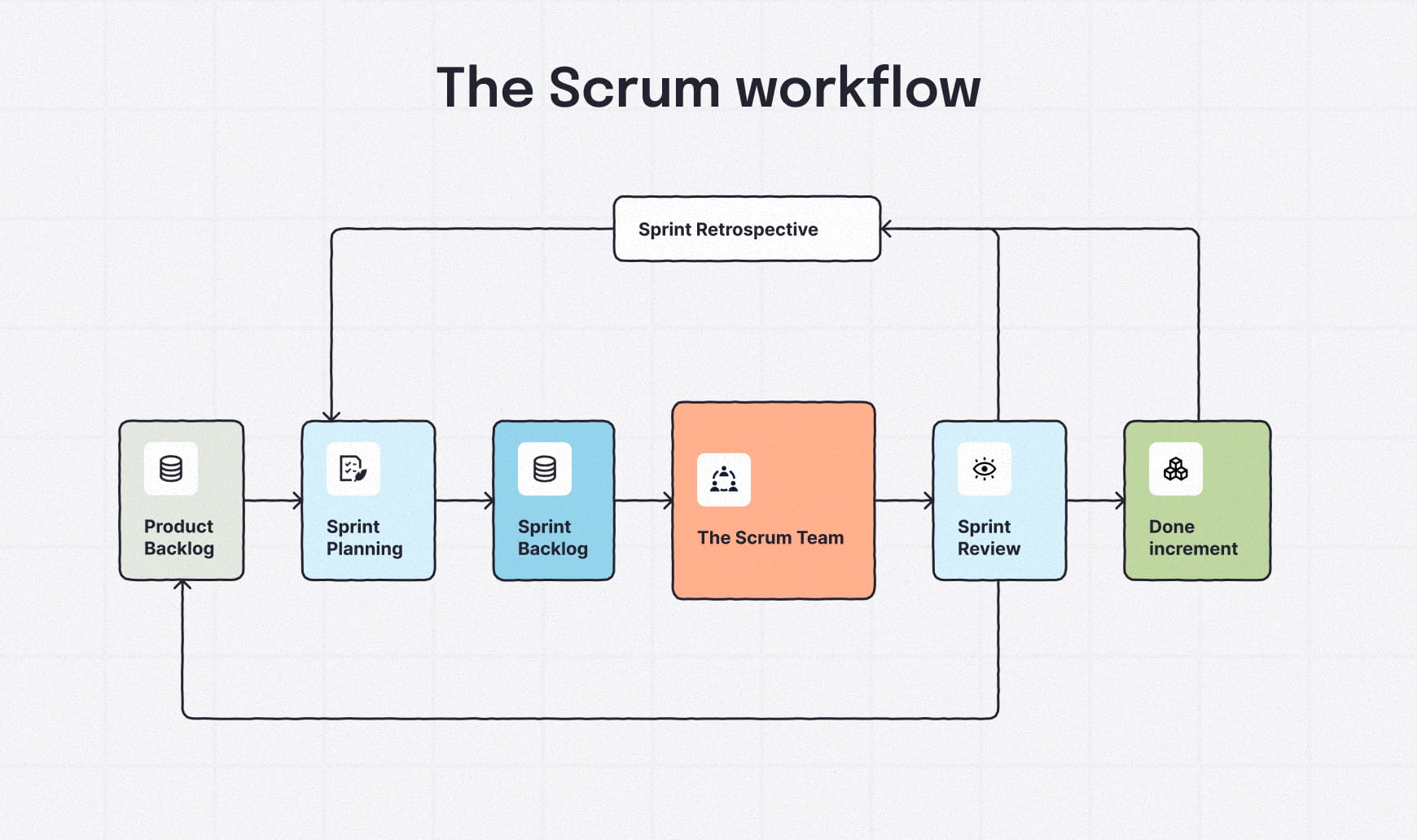
The emphasis is on predictability and incremental progress across the delivery team. Each sprint begins with a meeting to define what will be delivered. Goals, product features and user stories are then broken down into smaller, deliverable chunks called "slices" that can be completed within a sprint. Product owners and Scrum Masters coordinate and align priorities across the whole team.
Sprints end with a review to showcase the work, gather feedback and get set up for the sprint ahead.
The team selects the sprint length, with shorter sprints making it easier to adapt when user needs or requirements change. The Scrum process structure creates a regular heartbeat for everyone to evaluate their progress and adjust goals.
Think of it as a timed race where the delivery team clears a specific set of hurdles before crossing a finish line and starting the next lap.
Basic Scrum terminology for UX teams: quick reference
Sprint
A fixed-length time period agreed upon by the team, during which designers, developers and product roles work toward a defined set of goals.
Product backlog
A prioritized list of work items, generally in the form of user stories, that will be taken on in future sprints.
Sprint planning
A session where the team decides what work will be included in the upcoming sprint, including design tasks that support future development.
Sprint review
A meeting held at the end of a sprint to review completed work and gather feedback, including UX and design outcomes; also known as retrospectives.
Scrum team
The cross-functional team responsible for delivering work during a sprint, including designers, developers and other product roles.
Scrum Master
A facilitator who helps the team apply Scrum effectively and address process-related obstacles.
Scrum board
A sprint-specific board that’s home to the sprint planning and the sprint backlog for visualizing tasks from the backlog as they move toward completion.
Slices
Work broken down into smaller chunks, either across one team (horizontal slices) or across all departments (vertical slices).
How to apply Scrum to UX design
Scrum creates the delivery rhythm for an Agile team, but there’s an issue: UX work rarely fits neatly within sprint boundaries. UX activities like research, design and validation tend to continue throughout delivery and frequently span multiple sprints.
Scrum meetings break product goals into slices that surface UX work and design tasks that support upcoming development, even if that design work began earlier or continues beyond the sprint itself.
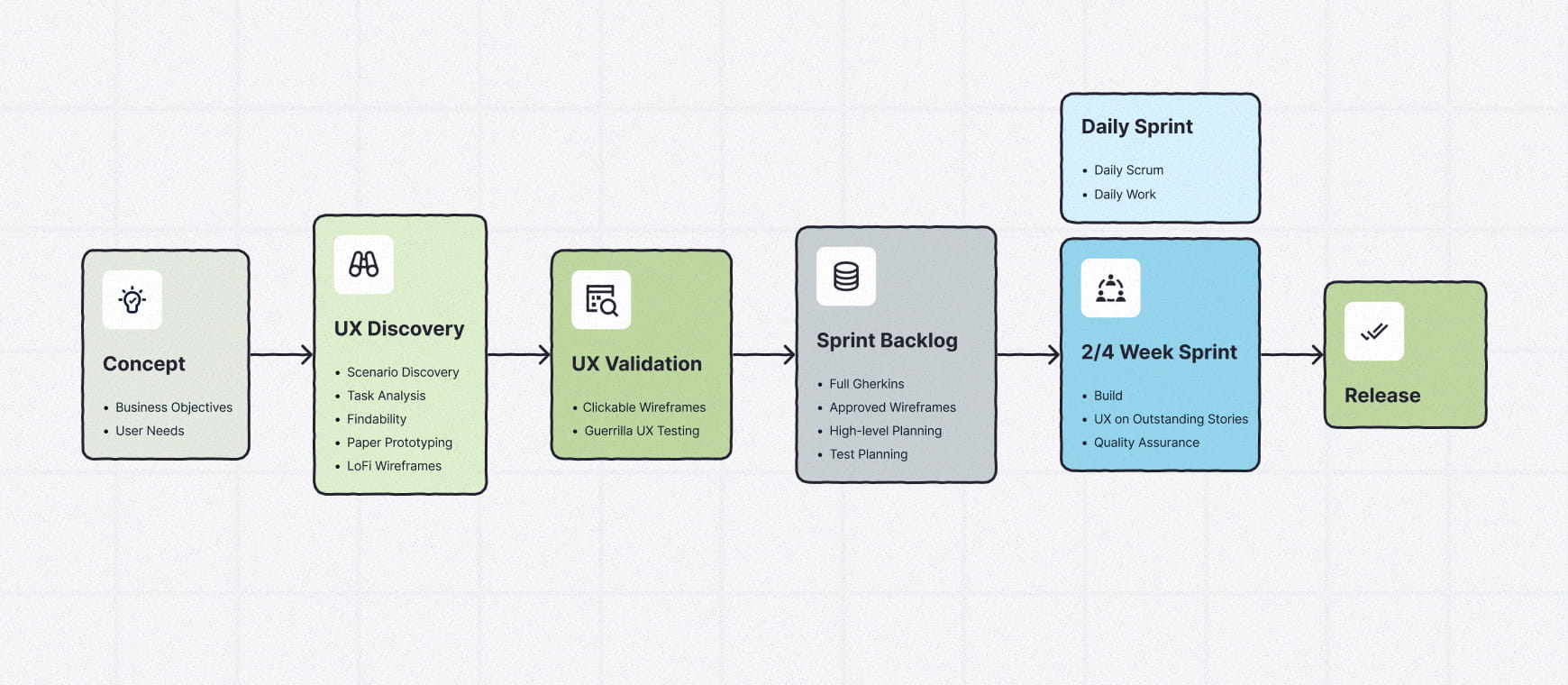
For UX professionals, a simplified example might include:
- Discovery
- User research
- Wireframes
- Design concepts
- Mockups
- Usability testing
- Launch
Within each slice, more specific UX activities are planned into the current sprint or carried forward into future sprints. For example, a discovery-focused design sprint would include more detailed tasks:
Sprint: Discovery
- UX research and user insights
- Analytics review and testing
- Stakeholder input
- Brand exploration
- Accessibility audit
As UX work is moved to "done," tasks from the backlog are brought into planning for the next sprints. Items that aren’t completed or ready for development work are picked back up during future planning as priorities evolve.
At the end of each sprint, UX team members review completed work and reflect on what can be improved before the upcoming sprint planning meeting.
Benefits of Scrum in UX design
Scrum provides a delivery rhythm that helps UX work stay connected to product goals and development timelines. In addition to structure and predictability, it offers several benefits that support feedback, collaboration and continuous improvement in UX design.
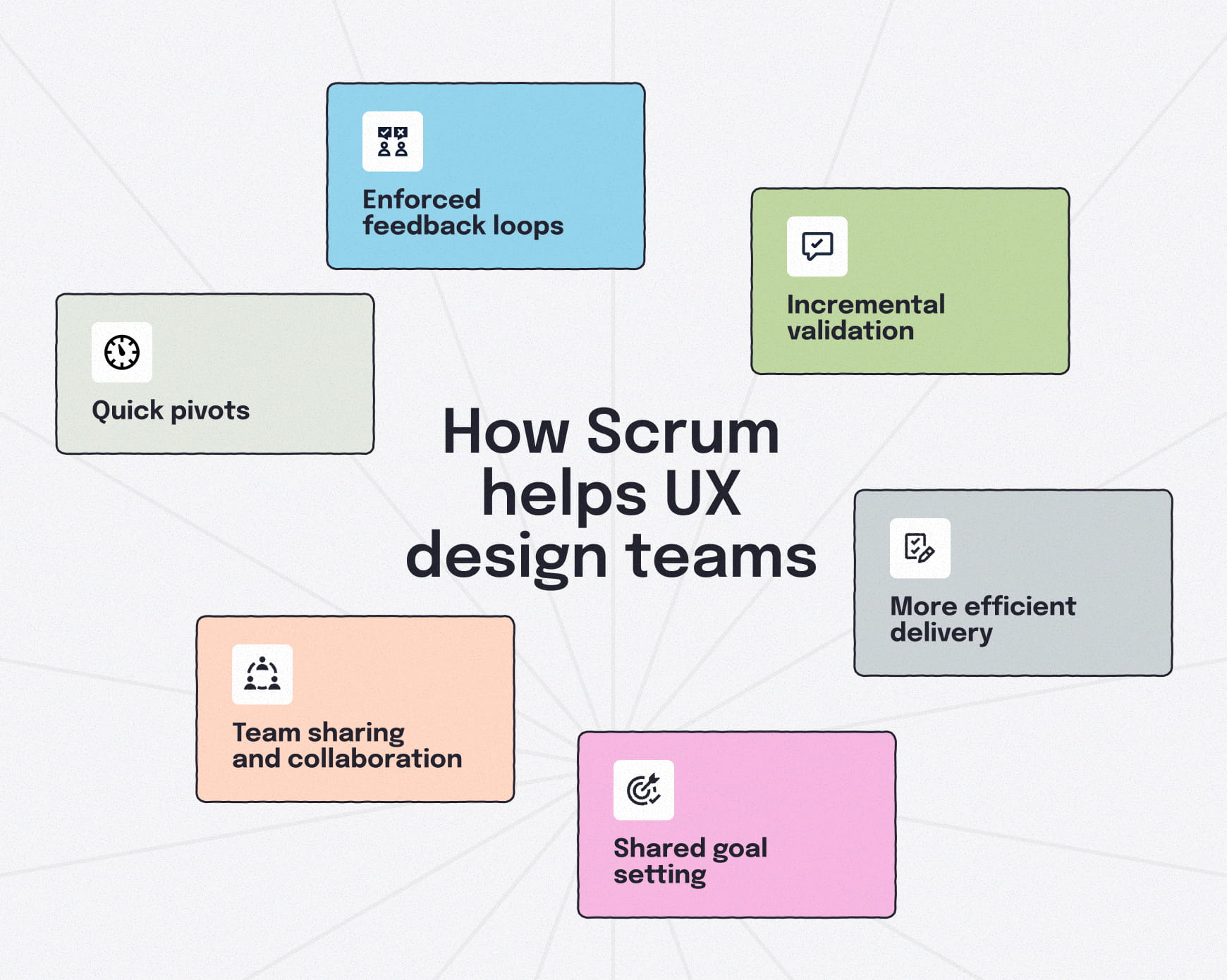
Quick pivots and response times
Because work is planned in short cycles, UX teams can reassess priorities more frequently. Shifts in requirements, stakeholder feedback or technical constraints can be addressed in upcoming sprints without disrupting the entire roadmap or project timeline.
For UX teams, it becomes easier to revisit design decisions and adapt work as new insights emerge, while still maintaining delivery momentum.
Enforced feedback loops
Scrum builds regular feedback into the delivery cycle through sprint reviews and checkpoints. For UX designers, this creates predictable moments to review UX work, validate decisions and gather input before designs move too far downstream.
This reduces late-stage UX feedback and helps teams catch issues earlier, when changes are easier to make.
Incremental validation
Because Scrum encourages delivering work in small, reviewable increments, UX teams can validate assumptions gradually instead of all at once. Designs can be tested, refined and adjusted as features take shape, reducing the likelihood of major rework later.
This incremental approach supports learning while keeping design aligned with what’s actually being built.
Team sharing and collaboration
Scrum creates shared touchpoints where designers, developers and product roles review progress together. These moments help UX designers explain decisions, address work-in-progress constraints and align expectations.
Regular collaboration and daily stand-ups also make it easier to address blockers early, rather than discovering misalignment late in the sprint.
Shared goal setting
Scrum centers work around sprint goals that the entire team commits to. This shared focus helps UX designers align their / with delivery priorities instead of working toward isolated design milestones.
When challenges arise, teams can negotiate tradeoffs, provide additional support and/or redistribute effort to protect the sprint goal, keeping progress on track.
More efficient delivery
The structure of Scrum planning reveals patterns in how a team works. Over time, they can identify potential solutions to recurring obstacles, making future projects easier to predict.
By reviewing outcomes regularly, product owners and Scrum masters can build a more efficient development process that accounts for the unique pace of UX work.
Differences between Kanban and Scrum
| Kanban | Scrum | |
|---|---|---|
| Philosophy | Continuous flow of work | Work delivered in fixed, time-boxed sprints |
| Commitment | Tasks are pulled individually as capacity allows | Work is planned and committed to in batches for each sprint |
| Roles | Flexible, no predefined roles required | Structured roles, including Product Owner and Scrum Master |
| Flexibility | Open to changes and iteration at any time | Changes discouraged during a sprint, revisited between sprints |
| Primary goal | Sustainable pace; reducing work in progress (WIP) | Team alignment around meeting a shared sprint goal |
| Success metric | Cycle time: how long it takes for work to move from start to finish | Sprint velocity: how much work the team completes per sprint |
Scrumban: where Scrum and Kanban meet
In practice, many product and UX teams don’t work exclusively in Scrum or Kanban. Instead, they operate somewhere in between, combining both Agile frameworks into a hybrid approach known as Scrumban.
Scrumban combines the structured planning cadence from the Scrum environment with Kanban’s emphasis on continuous flow. Teams still plan work one sprint at a time, aligning around shared goals, while integrating design through a more flexible, visual system that isn’t strictly bound to the sprint timelines.
For UX designers, this blended workflow often reflects reality more accurately than either framework alone. Research, exploration and validation can move continuously, while still supporting sprint-based delivery and development milestones.
Scrumban allows structure and adaptability to coexist on modern product teams, without requiring strict adherence to a single methodology.
Scrum and Kanban Tools
Not sure where to start with Kanban and Scrum for your team? There are plenty of tools out there to help any organization move into the Agile world:
- Trello — A lightweight, card-based tool commonly used for Kanban-style workflows and flexible enough to support basic Scrum boards and sprint tracking. Ideal for smaller teams that need a low-friction way to move design tasks through a pipeline.
- Jira — A widely used platform for Scrum teams, especially in cross-functional product environments where UX design works closely with engineering. Jira supports sprint planning, backlog management and hybrid Kanban/Scrum workflows at scale, making it a favorite for aligning UX design with the engineering team.
- Asana — A task and project management tool that supports visual boards, timelines and structured planning. Often used by UX and product teams that need flexibility without rigid Scrum mechanics. The ability to toggle to list view helps with backlog refinement.
- Monday.com — A configurable work management platform that supports both flow-based and sprint-based workflows. Commonly used by teams that need visibility and coordination across disciplines like UX design, content and development.
Choosing between Kanban and Scrum for UX
There’s no single best choice; Kanban and Scrum address different aspects of how UX design workflows move to meet business goals.
Kanban focuses on sustainable pace, visibility and managing work in progress — making it well-suited for work that evolves continuously. Scrum provides a structured delivery rhythm that helps teams align around shared goals and review progress at regular intervals.
Many UX design teams ultimately blend both approaches. Scrumban reflects this reality by combining Scrum’s cadence with Kanban’s flow, allowing UX work to move continuously while still supporting sprint-based delivery.
Understanding these frameworks helps UX designers better navigate how their work fits within modern product teams—and choose the balance of structure and flow that best supports their design process.
Whether your team works in sprints, flow or a hybrid model, having a clear, shared view of your website structure and content plan makes collaboration easier. Tools like Slickplan help UX teams map site architecture, plan content and align design decisions with delivery workflows — making handoffs clearer and more consistent.


Think visually. Improve UX with Slickplan
Build intuitive user flows, stronger customer journeys and improve information architecture.
Frequently asked questions
What are the four principles of Kanban?
The four principles of Kanban are visualizing work, limiting work in progress (WIP), focusing on flow, and continuously improving the system. Together, these principles help teams manage priorities, reduce bottlenecks and improve how design work moves from start to finish
What is Kanban design?
Kanban design refers to applying Kanban principles to design work. For UX teams, this means visualizing design tasks, limiting work in progress and allowing research, exploration and iteration to move continuously rather than being confined to fixed delivery cycles.
What are communities of practice in Scrum?
Communities of practice are informal groups where team members with shared expertise — like UX designers — collaborate across Scrum teams. They provide space to share knowledge, align standards and solve problems without being tied to sprint-specific delivery commitments.
What is Scrum in UX design?
In UX design, Scrum provides a structured delivery rhythm through time-boxed sprints. Continuous delivery of UX work contributes to sprint goals while often spanning multiple sprints, supporting research, design and validation alongside development rather than fitting neatly into a single sprint cycle.


 Facebook
 X
X Youtube
 LinkedIn
 Vimeo
Vimeo